Base Node Classes
This section describes the base classes for all node classes that libavg provides.
To be rendered, a Node must be part of a scene graph. Scene graphs are trees of Node objects associated with a Canvas. A CanvasNode is at the root of each scene graph. Scene graphs are pure tree structures, so each Node only has one parent node. Nodes that are not linked to a canvas are not rendered. Any media that these nodes need are loaded from disk, however.
libavg Node classes make heavy use of inheritance. Concepts like id, position and opacity are defined in base classes and can be used in any of the subclasses.
Note
To reduce redundancy in the reference, inherited methods and attributes are not mentioned in the derived class documentation - follow the link to the base class to access them. This also applies to constructor parameters: When constructing an object of a derived class, constructor parameters of the base classes are also accepted.
There are several ways of constructing a node. The reference documentation follows the python constructor syntax. The parameters remain the same in all syntactic variations, however. The options for construction are as follows:
- Use the standard python constructor:
Nodes can be created using a standard python constructor. As an example:
node = ImageNode(id="background", href="sunset.png", pos=(0,0),
        parent=rootNode)
Parameters to a node constructor are always named parameters. Nodes never have positional constructor parameters.
- Use Player.createNode():
There are two ways to create a node using createNode:
node = player.createNode("image",
        {"id":"background", "href":"sunset.png", "pos":(0,0),
         "parent":rootNode})
and:
node = player.createNode(
        """<image id="background" href="sunset.png"
                      pos="(0,0)"/>""")
Using the second option, complete trees of nodes can be constructed in one statement.
- Load it from an avg file:
Complete scene graphs for onscreen display can be loaded from disk using Player.loadFile():
root = player.loadFile("scene.avg")- Create a complete scene graph using inline xml:
Player.loadString() allows using an avg-formatted xml string to create a scene graph of nodes:
root = player.loadString("""
        <avg size="(800,600)">
            <image id="background" href="sunset.png"
                      pos="(0,0)"/>
        </avg>
    """)
The methods Player.loadFile() and Player.loadString() create onscreen scene graphs. Player.loadCanvasFile() and Player.loadCanvasString() are the equivalent methods for offscreen canvases.
- class libavg.avg.Node([id: string, parent: DivNode=None])
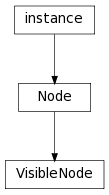
Bases: Boost.Python.instance
Base class for everything that can be put into an avg tree.
- id
A unique identifier that can be used to reference the node, for instance using Player.getElementByID(). Read-only.
- parent
A DivNode that the node will become a child of. Equivalent to calling DivNode.appendChild() directly after construction.
- class libavg.avg.VisibleNode([oncursormove, oncursorup, uncursordown, oncursorover, oncursorout, active=True, sensitive=True, opacity=1.0, parent])
Bases: libavg.avg.Node
Base class for all elements in the avg tree that have a visual representation. All nodes except those derived from FXNode are VisibleNodes.
param string oncursormove: Name of python function to call when a cursor moves.
Deprecated since version 1.5: Use setEventHandler() instead.
param string oncursorup: Name of python function to call when an up event occurs.
Deprecated since version 1.5: Use setEventHandler() instead.
param string oncursordown: Name of python function to call when a down event occurs.
Deprecated since version 1.5: Use setEventHandler() instead.
param string oncursorover: Name of python function to call when a cursor enters the node.
Deprecated since version 1.5: Use setEventHandler() instead.
param string oncursorout: Name of python function to call when a cursor leaves the node.
Deprecated since version 1.5: Use setEventHandler() instead.
param DivNode parent: A DivNode that the newly constructed Node should be appended to.
- active
If this attribute is true, the node behaves as usual. If not, it is neither drawn nor does it react to events.
- opacity
A measure of the node’s transparency. 0.0 is completely transparent, 1.0 is completely opaque. Opacity is relative to the parent node’s opacity.
- sensitive
A node only reacts to events if sensitive is true.
- connectEventHandler(type, source, pyobj, pyfunc)
Sets a callback function that is invoked whenever an event of the specified type from the specified source occurs. Unlike setEventHandler(), this method allows several handlers for one type/source-combination. To remove a handler installed using connectEventHandler(), call disconnectEventHandler().
Parameters: - type – One of the event types KEYUP, KEYDOWN, CURSORMOTION, CURSORUP, CURSORDOWN, CURSOROVER, CURSOROUT, RESIZE or QUIT.
- source – MOUSE for mouse events, TOUCH for multitouch touch events, TRACK for multitouch track events or other tracking, NONE for keyboard events. Sources can be or’ed together to set a handler for several sources at once.
- pyobj – The python object that hosts the callback. This parameter is only needed so that disconnectEventHandler() can be called to remove all handlers hosted by one object in one call.
- pyfunc – The python callable to invoke. This callable must take the event to process as a parameter. In contrast to callbacks set up using setEventHandler(), it should not return anything. If connectEventHandler() is used, all events bubble up the tree. pyfunc may not be None.
- disconnectEventHandler(pyobj[, pyfunc])
Removes one or more event handlers from the node’s table of event handlers. If several event handlers conform to the parameters given, all are removed. It is an error if no matching event handler exists.
Parameters: - pyobj – The python object that hosts the event handler.
- pyfunc – The python callable that should not be called anymore. If pyfunc is absent, all callbacks hosted by pyobj are removed.
- getAbsPos(relpos) → Point2D
Transforms a position in coordinates relative to the node to a position in window coordinates.
- getElementByPos(pos) → Node
Returns the topmost child node that is at the position given. pos is in coordinates relative to the called node. The algorithm used is the same as the cursor hit test algorithm used for events.
- getParent() → Node
Returns the container (AVGNode or DivNode) the node is in. For the root node, returns None.
- getRelPos(abspos) → Point2D
Transforms a position in window coordinates to a position in coordinates relative to the node.
- releaseEventCapture([cursorid])
Restores normal cursor event handling after a call to setEventCapture(). cursorid is the id of the cursor to release. If cursorid is not given, the mouse cursor is used.
- setEventCapture([cursorid])
Sets up event capturing so that cursor events are sent to this node regardless of the cursor position. cursorid is optional; if left out, the mouse cursor is captured. If not, events from a specific tracker cursor are captured. The event propagates to the capturing node’s parent normally. This function is useful for the implementation of user interface elements such as scroll bars. Only one node can capture a cursor at any one time. Normal operation can be restored by calling releaseEventCapture().
- setEventHandler(type, source, pyfunc)
Sets a callback function that is invoked whenever an event of the specified type from the specified source occurs. This method removes all other event handlers from this type/source-combination.
Parameters: - type – One of the event types KEYUP, KEYDOWN, CURSORMOTION, CURSORUP, CURSORDOWN, CURSOROVER, CURSOROUT, RESIZE or QUIT.
- source – MOUSE for mouse events, TOUCH for multitouch touch events, TRACK for multitouch track events or other tracking, NONE for keyboard events. Sources can be or’ed together to set a handler for several sources at once.
- pyfunc –
The python callable to invoke. This callable must take the event to process as a parameter. If pyfunc returns None or False, the event bubbles up the node tree. If it is True, bubbling is suppressed.
If pyfunc is None, the previous handler is removed.
- unlink([kill=False])
Removes a node from it’s parent container. Equivalent to node.getParent().removeChild(node.getParent().indexOf(node)), except that if the node has no parent, unlink does nothing. Normally, unlink moves the node’s textures back to the CPU and preserves event handlers. If kill=True, this step is skipped. Event handlers are reset, all textures are deleted and the href is reset to empty in this case, saving some time and making sure there are no references to the node left on the libavg side. kill should always be set to True if the node will not be used after the unlink.